Start with science.
Jump to PubMed, MedlinePlus, OpenStax, and NASA. The science search option adds a Google filter for six research and education sources; general web search is one setting away.
A BROWSER BY ANATOMY IN MINUTES
 AiM Browser
Follow your curiosity. Keep your sources close.
Make your browser feel like yours.
Windows desktop beta • Five themes • Five accent colors
FIND YOUR COLOR
Deep teal. Electric blue. Lime highlights.
Or a whole different mood.
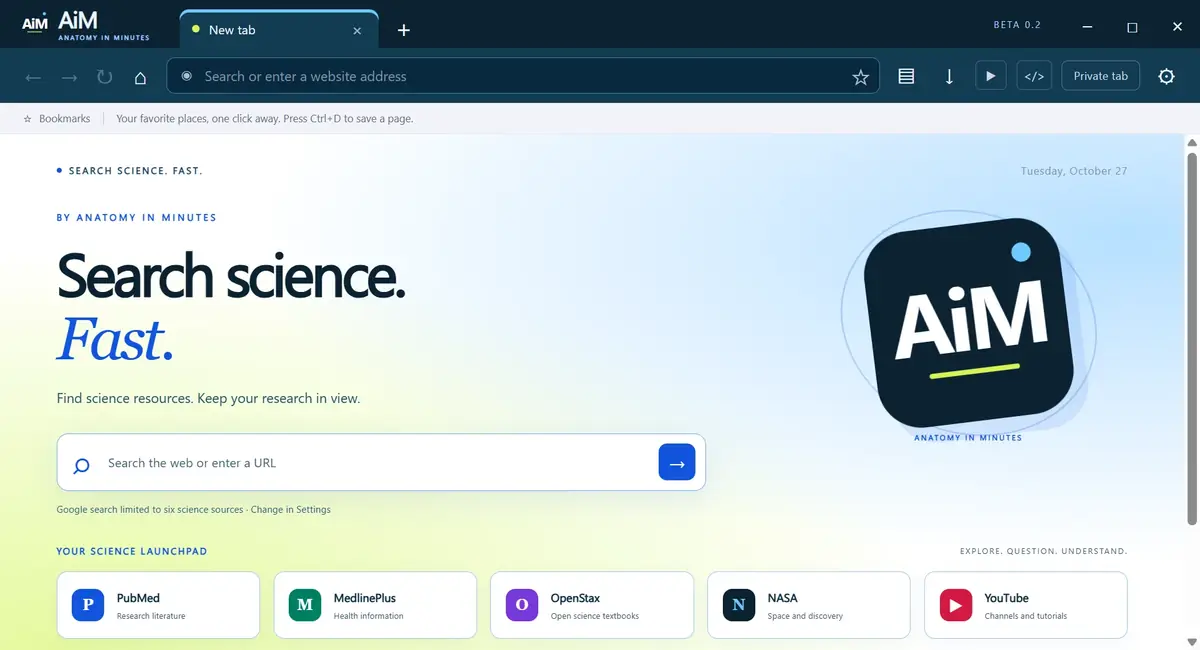
Actual desktop beta • White theme • Five themes and five accent colors included.
Jump to PubMed, MedlinePlus, OpenStax, and NASA. The science search option adds a Google filter for six research and education sources; general web search is one setting away.
Open YouTube or the ChatGPT website beside your tabs. Choose a YouTube channel by its handle while you browse.
These are website side windows. AiM does not include a Codex browser-control plugin. Service accounts and terms apply.
Save bookmarks, choose a search engine, switch between five themes, and pick an accent color. Private tabs use a temporary session.
GET AiM BROWSER
Discover a colorful Windows browser with science shortcuts, five themes, and side windows for learning as you browse.
Loading release details…
Windows may show “Windows protected your PC” or “Unknown publisher.” AiM is not yet available in Microsoft Store. Store submission is being prepared; there is no Store release date yet. Keep Windows security protections enabled.
HELP & RELEASE STATUS
AiM is an early Windows browser built with Electron and Chromium. It is independently published by Anatomy in Minutes.
Contact AiM support ↗Return to this page to download the latest website beta. AiM does not yet update automatically. Microsoft Store delivery and updates will be available only after approval.
Extension installation, password management, account sync, DRM playback, and a built-in phishing-protection service are not included. Some services may reject embedded browsers. Authenticated YouTube and ChatGPT workflows have not been fully tested. Use a maintained mainstream browser for sensitive accounts while this beta is under review.
No. It is Google search with a filter for PubMed, MedlinePlus, OpenStax, NASA, NOAA, and USGS. Results are limited by that selection and Google indexing. You can change to Google, Bing, or DuckDuckGo for broader searches. Source links do not imply endorsement.
Private tabs do not save AiM browsing history, and their shared temporary cookies are cleared when the last private tab closes. Downloads and bookmarks remain. YouTube and ChatGPT side windows use the regular session, including when a private tab is selected. Private browsing does not hide activity from websites or your network provider. Read the browser privacy policy.